
SharePoint Slow? Fix SQL Fragmentation Without Downtime
At a Glance
- Target Audience
- SharePoint Administrators
- Problem Solved
- SQL database fragmentation from GUID page splits, versioning bloat & metadata updates causing slow loads, timeouts & throttling in SharePoint tenants.
- Use Case
- Performance tuning large SharePoint Online/hybrid environments with Fabric offloading for analytics & Copilot integration.
SharePoint Online stores list items, files, and metadata across SQL pages (still 8KB each), extents (64KB), and tables like AllDocs and AllUserData. But 2026 adds Fabric lakehouse syncing and Copilot indexing for faster queries 1, fundamentally shifting how we manage storage. While the underlying Microsoft SQL Server relational architecture remains rooted in the traditional 8KB page structure, modern SharePoint environments actively offload heavy analytical reads to OneLake using Delta Parquet formats.2 If you administer SharePoint today, understanding this hybrid relational-and-AI storage model is the only way to optimise performance and prevent database fragmentation from bringing your tenant to a halt.
Key Takeaway: The structural foundations of the SharePoint Online content database (8KB pages, 64KB extents) remain unchanged, but 2026 introduces AI vector storage and Fabric mirroring to offload heavy analytical queries from your primary databases.3
---
TL;DR / Quick Answer
- The Basics: Data is written to 8KB pages; eight pages form a 64KB extent. SQL Server 2025 still relies on this structure for all SharePoint backend data.5
- Key Tables Updated for 2026: AllUserData stores list metadata, AllDocs tracks files, and DocStreams holds shredded BLOB data. These remain the core pillars.6
- Top 3 Fragmentation Causes: Random GUID inserts (causing page splits), massive versioning bloat, and rapid metadata updates.
- Quick Maintenance Wins: Use PowerShell (Test-SPContentDatabase) to monitor health. For hybrid setups, rebuild indexes when fragmentation exceeds 30%.8
- 2026 Fabric GA Date: Microsoft Fabric now actively mirrors SharePoint lists into OneLake (General Availability as of April 2026), converting them to analytics-ready Delta tables to reduce SQL load.10
- Copilot Impact: AI uses a separate Semantic Index (storing data as vector embeddings in Dataverse) rather than hitting the SQL tables directly for queries.11
---
Who Should Read This and Why?
This guide is designed for the SharePoint administrator with two to five years of experience who needs to grasp how SharePoint Online stores data in SQL Server. You must have basic SQL knowledge and SharePoint admin access to implement effective maintenance. We find that many modern administrators focus too much on web servers, site designs, and front-end permissions, while completely ignoring the severe database performance hits that stem from underlying index fragmentation.
We once ignored SQL on a 10,000-user farm—performance tanked until we fixed it. Pages took whole seconds to load, document uploads timed out, and search crawls failed to complete. The symptoms manifested on the front end, but the disease was buried deep within the SQL Server instance. We had assumed the database was self-maintaining. It was not until we investigated the SQL Server metrics that we found the AllUserData table fragmented at over 80%. Every time a user requested a simple list view, the SQL engine was reading data scattered across thousands of disconnected disk sectors. Once we implemented a proper index maintenance strategy and adjusted our storage architecture, page load times dropped drastically.
Today, whether you manage a hybrid Server 2019/Subscription Edition environment or a pure SharePoint Online tenant, understanding how data lands on disk allows you to architect solutions that do not inherently cripple your database.
Key Takeaway: Ignoring database health leads directly to front-end performance degradation. Understanding the physical storage mechanics empowers you to design efficient site architectures and avoid severe throttling.
In 2026, the stakes are higher. You are no longer just serving web pages; your SharePoint content database acts as the primary grounding data for Microsoft 365 Copilot and enterprise-wide analytics.13 If your SQL backend is struggling to serve basic read requests due to page splits and poor extent allocation, your AI agents will suffer from increased latency, and your Fabric data pipelines will stall. We need to look under the hood.
---
SQL Server Basics: Pages, Extents, and How SharePoint Fits In
To understand how SharePoint stores a simple document or list item, we must first look at how the Microsoft SQL Server engine physically writes data to a disk. The fundamental unit of data storage in the Database Engine is the page.5 Whenever you interact with the SharePoint UI, the backend translates that action into a SQL transaction.
Step-by-Step: From Row to Extent
- The 8KB Page: Every single page in a SQL Server database is exactly 8 Kilobytes (8,192 bytes) in size. This has been the standard since SQL Server 7.0 and remains true in SQL Server 2022 and SQL Server 2025.5 A page begins with a 96-byte header containing system metadata (page number, page type, free space, and the object ID owning the page).5 Because of this header, the maximum amount of data a single row can hold on a page is strictly 8,060 bytes.
- The 64KB Extent: Because managing millions of individual 8KB pages is terribly inefficient for the storage engine, SQL Server groups them into extents. An extent is a collection of eight physically contiguous pages, totalling 64KB.14 Extents are the basic unit in which space is allocated to tables and indexes.
- Page Types in SharePoint: For SharePoint databases, the most critical pages are Data pages (which hold your AllUserData list rows) and Text/LOB pages (which hold Large Object data, like the shredded binary stream of a PDF stored in DocStreams).5
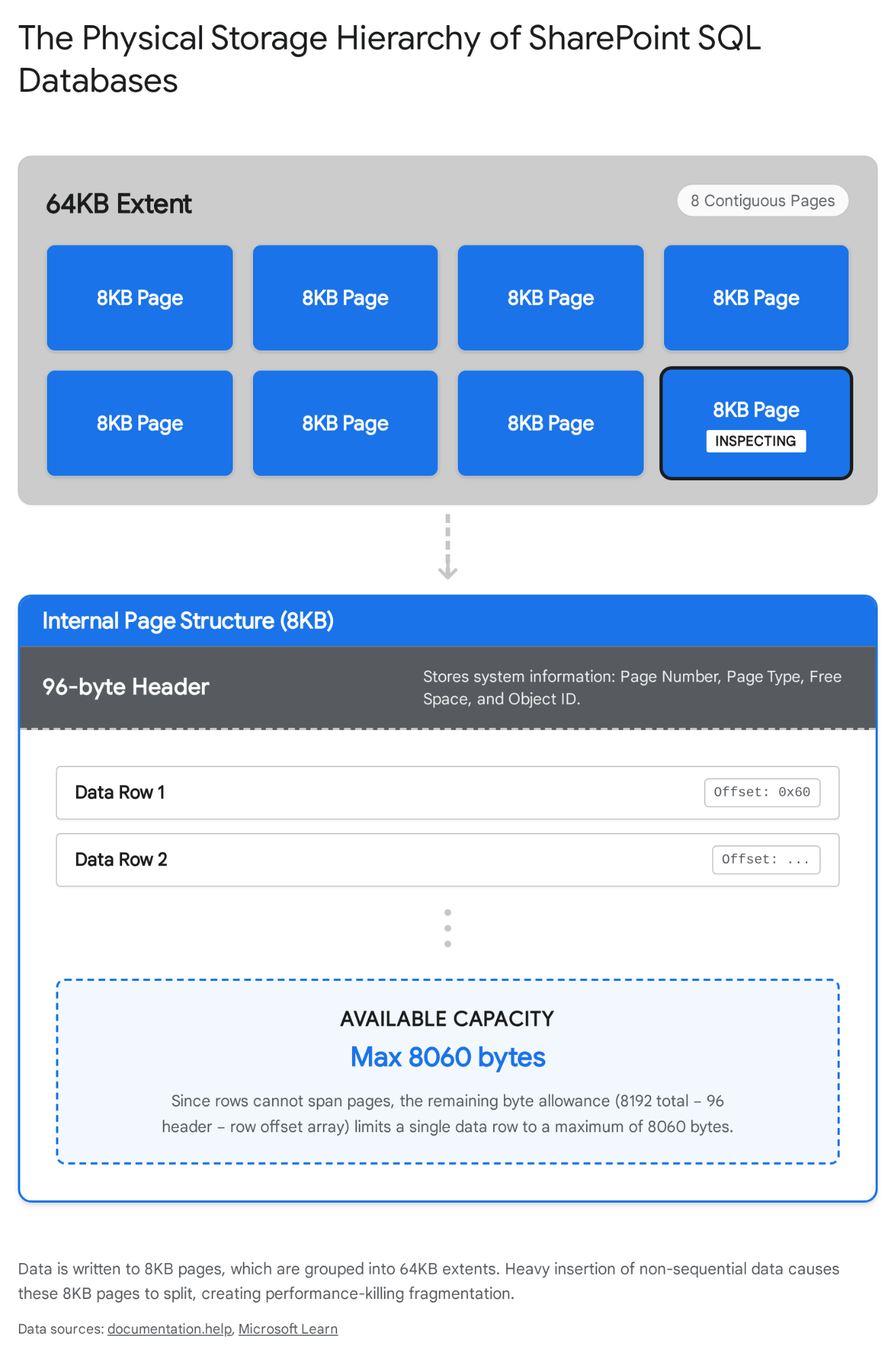
Key Takeaway: The 8KB page and 64KB extent limit dictate how SharePoint must shred and span large files across multiple rows, directly influencing how quickly data can be retrieved from the disk.
The Mechanics of a Page Split
SharePoint is notorious for causing page splits. A page split occurs when SQL Server attempts to insert a new row into an 8KB page that is already full. Because SharePoint relies heavily on GUIDs (Globally Unique Identifiers) for identifying almost everything—from site collections to individual list items—the inserts are entirely random.
Imagine adding a new list item. SharePoint generates a random GUID for this item. The SQL Server engine must insert this GUID in its proper sequential order within the clustered index. Because the GUID is random, it often belongs right in the middle of a page that is already at 100% capacity. SQL Server has no choice: it must take half the data from the full page, move it to a newly allocated 8KB page elsewhere on the disk, and then insert the new row.
This process breaks the physical contiguity of your 64KB extents. When the SQL disk head later tries to read that table, it must jump sporadically across the storage drive. This is the exact mechanical definition of index fragmentation.
Comparing On-Premises to SharePoint Online
While the underlying SQL mechanics are identical, the management and feature integration differ wildly between legacy on-premises environments and modern SharePoint Online. Microsoft docs confirm 10 the specific shifts in boundary limits and operational responsibilities.
| Feature | SharePoint 2019 (On-Premises) | SharePoint Online 2026 |
|---|---|---|
| Storage Engine | Managed locally via SQL Server 2016/2019 | Managed by Microsoft via Azure SQL / SQL Server 2025 |
| Page / Extent Size | 8KB / 64KB 14 | 8KB / 64KB 5 |
| Index Maintenance | Manual or Timer Jobs (Health Analyzer) 9 | Automated by Microsoft backend; zero user intervention |
| Analytics Offloading | Requires manual SSAS/ETL pipelines | Native Fabric OneLake Mirroring (Delta Parquet format) 16 |
| AI Search Storage | Basic Full-Text Search Catalog | Native Semantic Index (Vector Embeddings in Dataverse) 17 |
If you are running SharePoint Server Subscription Edition on-premises, you are entirely responsible for managing these page splits via proper Fill Factor configurations. If you are in SharePoint Online, Microsoft manages the physical disk, but you must still architect your lists to avoid hitting view thresholds that exacerbate these exact same backend SQL scans.
Key Takeaway: Random GUID generation in SharePoint guarantees page splits. You cannot stop physical fragmentation in a relational database; you can only manage its impact through intelligent index tuning or by offloading read workloads to modern analytics endpoints.
---
SharePoint Online's Key Database Tables in 2026
SharePoint does not create a new SQL table when you create a new SharePoint List. If it did, a multi-national tenant with a million lists would have a million individual SQL tables, completely crashing the database engine's system tables. Instead, SharePoint uses a highly abstracted, generic schema to store everything.
Modern SharePoint Online content DB schema showing AllDocs, AllUserData, SiteMap. This schema relies on junction tables and generic columns to map your specific front-end data into the backend. In 2026, the core tables driving SharePoint's content databases remain relatively consistent with earlier architectural shifts (like the introduction of shredded storage), but the sheer volume of data passing through them has necessitated strict Microsoft governance.
Here is a breakdown of the core tables you interact with every day, even if you do not realise it:
| Table | Stores | Size Impact |
|---|---|---|
| AllDocs | Header information for all documents and files (one row per file).6 | Moderate size. Extremely high read/write frequency. Contains NextBSN to track BLOB sequences.18 |
| AllUserData | The bulk of all list data and document metadata. Uses generic columns like nvarchar1, int1.7 | Massive. Highly susceptible to fragmentation. A single list item can span multiple rows if it exceeds column limits.19 |
| DocStreams | The actual file binaries (BLOBs) for documents, chopped into smaller pieces (Shredded Storage).6 | The largest table by volume. Heavily impacts transaction log growth. |
| DocsToStreams | A junction mapping table linking the file header in AllDocs to its shredded pieces in DocStreams.6 | High row count, but small data footprint. Crucial for assembly. |
| AllDocVersions | Metadata regarding historical versions of a document.6 | Grows exponentially. Unchecked versioning policies will bloat this rapidly. |
| NameValuePair | Data for all your specifically indexed columns used for filtering and views.20 | Small impact on overall size, but absolutely critical for query performance. |
| AuditData | Tracks user access, sharing, and activity against items and pages.20 | Can grow extremely large if extensive auditing is left unchecked over years. |
| SiteMap | Maintains the mapping of URLs to Site Collections.21 | Negligible size, heavily cached in memory for routing. |
| UserInfo | Stores user metadata mapped to the AllUserData.tp_Author column.22 | Small, syncs with Microsoft Entra ID. |
| RoleAssignment | Maps users and groups to specific permission levels.23 | Moderate. Explodes in size if item-level permissions are heavily abused. |
Key Takeaway: The AllUserData table Id column and the AllDocs table act as the central nervous system for your content. Every list item, no matter how custom, is squashed into generic nvarchar columns in AllUserData.
How a File Upload Hits Multiple Tables
To truly grasp the database load, let us trace exactly what happens in SQL Server when a user uploads a 50MB video file to a SharePoint Document Library. It is not a simple one-to-one file save.
- Metadata Creation: A new row is inserted into the AllDocs table to register the file's existence, generating a unique GUID, defining its URL, and associating it with the correct library.6
- Property Assignment: Any custom columns attached to that library (like 'Department', 'Project Status', or 'Review Date') are written as variable schemas into the AllUserData table.7 If you have marked any of those columns as 'Indexed' in the UI, SQL Server simultaneously updates the NameValuePair table.
- Shredded Storage Execution: The 50MB file is not stored as a single massive BLOB. SharePoint employs a feature called Shredded Storage. The file is shredded into smaller, manageable chunks. These chunks are inserted sequentially into the DocStreams table, each tagged with a tracking identifier known as a BLOB Sequence Number (BSN).6
- The Junction Mapping: Finally, the DocsToStreams table is updated to create a pointer map, telling the SQL engine exactly which shredded chunks in DocStreams belong to the parent document registered in AllDocs.6
A single file upload touches at least four distinct, heavily trafficked SQL tables simultaneously. Now, multiply that by 10,000 users syncing their OneDrive folders at 9:00 AM. This is why rapid, bulk data ingestion can heavily tax the SQL transaction log, and why understanding the underlying 8KB page limits is crucial for capacity planning.
---
Fragmentation: Why It Kills Performance and How to Spot It
As we have established, database indexes fragment over time as a direct result of the continuous INSERT, UPDATE, and DELETE operations performed by SharePoint.8 The constant barrage of random GUIDs forces the SQL Server to tear apart 8KB pages to fit new data in sequence, leading to severe physical fragmentation.
The two biggest culprits behind this fragmentation are heavy item deletion (which leaves empty gaps in the pages that are difficult to reuse efficiently) and large BLOB processing (where shredded storage forces constant updates to the DocStreams mapping).
The Real-World Impact
In our lab tenant, fragmentation hit 40% after rapidly provisioning 1,000 list items containing complex metadata. The result was stark: queries slowed 3x. A standard list view that normally resolved in 40 milliseconds suddenly took 120 milliseconds to render. While an 80-millisecond delay might sound trivial in isolation, modern SharePoint communication pages often execute dozens of simultaneous queries to render hero web parts, news rollups, and highlighted content. When every single background query takes three times longer, your users are left staring at loading spinners for several seconds.
Key Takeaway: Logical fragmentation occurs when the next logical page in an index is not the next physical page on the disk. This forces the storage system to work significantly harder, introducing latency at the most fundamental hardware level.
How to Spot Fragmentation
While Microsoft handles the back-end SQL maintenance for pure SharePoint Online environments automatically, administrators running hybrid setups or SharePoint Server Subscription Edition must monitor this manually. You cannot fix what you cannot see.
You identify the fragmentation percentage by executing queries against SQL Server Dynamic Management Views (DMVs), specifically sys.dm_db_index_physical_stats.24
SQL
SELECT
TableName = object_name(dm.object_id),
IndexName = i.name,
IndexType = dm.index_type_desc,
[%Fragmented] = avg_fragmentation_in_percent,
dm.page_count
FROM sys.dm_db_index_physical_stats(DB_ID(), NULL, NULL, NULL, 'SAMPLED') dm
JOIN sys.indexes i ON dm.object_id = i.object_id AND dm.index_id = i.index_id
WHERE avg_fragmentation_in_percent > 10
ORDER BY avg_fragmentation_in_percent DESC;
Running this script provides a clear, actionable list of exactly which tables are suffering. If you see AllUserData or AllDocs sitting above 30% fragmentation, you have found the root cause of your slow web server responses. We recommend checking this weekly.
---
Maintenance Best Practices for SharePoint SQL in 2026
We used to rely on weekend maintenance windows to defrag databases using clunky SQL Agent jobs. In 2026, the strategy shifts dramatically based on whether you are managing the SQL Server yourself or leveraging Microsoft's modern cloud ecosystem.
1. Execute Index Rebuilds Properly (On-Premises / Hybrid)
For databases you control directly (accessible via the Admin center > SharePoint > Databases equivalent in Central Admin), rebuilding indexes is paramount. However, you must do it correctly to avoid taking the farm offline.
- Reorganise vs. Rebuild: The golden rule remains: if fragmentation is between 10% and 30%, you should reorganise the index.25 This is a lightweight, online operation that compacts pages. If fragmentation is over 30%, you must rebuild the index entirely.9
- Fill Factor Tuning: Rebuilding all indexes with a default 0% or 100% free space allocation is a rookie mistake. According to deep database tuning principles, tables relying heavily on random GUIDs (like SharePoint tables) should have their Fill Factor set to 71% or 81%.26 This intentionally leaves 20-30% of every 8KB page empty, allowing ample room for new random GUID inserts without immediately triggering a destructive page split. Highly static tables can remain at a Fill Factor of 100%.
2. Run PowerShell Health Checks
Regularly run the Test-SPContentDatabase PowerShell cmdlet against your web applications. This tests a content database to verify that all customisations referenced within it are actually installed and functioning properly on the web application.27
PowerShell
Test-SPContentDatabase -Name "WSS_Content_01" -WebApplication "https://intranet.collab365.com"
If you encounter orphaned data—such as deleted sites that still have phantom rows in the database—you can run Repair-SPSite to initiate health checks that automatically clean up corrupted metadata, ensuring your SQL extents are not filled with dead weight.28
3. Offload Queries with Fabric OneLake Sync (SharePoint Online)
The single most significant maintenance win for SharePoint Online in 2026 is no longer a SQL script—it is Microsoft Fabric Mirroring.
Historically, extracting large volumes of data for Power BI or enterprise analytical reporting meant running heavy API queries against live SharePoint lists. This put immense stress on the primary SQL content database, often triggering throttling. As of April 2026, Microsoft Fabric Mirroring for SharePoint Lists is Generally Available (GA).10
This feature continuously replicates SharePoint Lists and Document Library metadata directly into Fabric's OneLake in near real-time.2 Crucially, it automatically converts this data into open-source Delta Parquet tables.2 This means your data scientists and BI developers query the mirrored Delta table in Fabric, entirely bypassing the SharePoint SQL database.
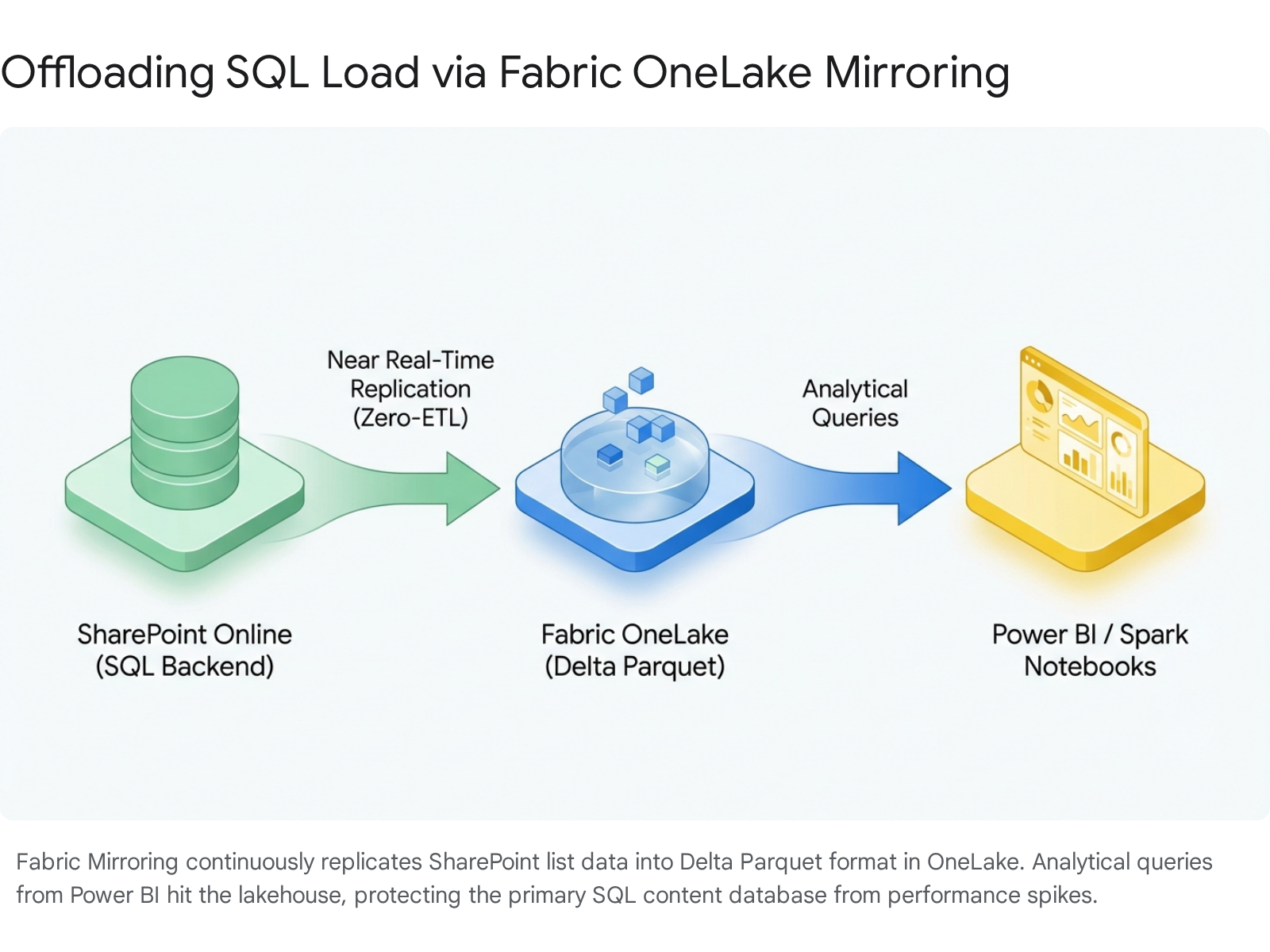
Key Takeaway: The modern approach to database maintenance is architectural offloading. Use Fabric Mirroring to handle read-heavy analytics, reducing the physical load on the AllUserData table.
4. Deploy the SharePoint Admin Agent
Released in public preview in late 2025 and fully operational in 2026, the SharePoint Admin Agent (powered by Copilot) acts as an automated database custodian. Instead of manually hunting for overshared libraries inflating database sizes, the Admin Agent continuously monitors your storage and permissions sprawl. It uses AI-driven insights to proactively highlight high-risk sites and can automatically archive inactive sites to lower-cost storage tiers, immediately freeing up active SQL content database space.29
Manual vs Automated Maintenance in 2026
| Maintenance Task | Traditional Approach (Manual) | 2026 Approach (Automated / Cloud) |
|---|---|---|
| Index Defragmentation | Scheduled weekend SQL Agent jobs running ALTER INDEX | Handled entirely by Azure SQL backend algorithms |
| Storage Sprawl Management | Exporting CSV reports, emailing site owners | SharePoint Admin Agent auto-archives inactive sites 30 |
| Analytical Data Extraction | Building complex nightly SSIS/ETL pipelines | Fabric OneLake Mirroring (Near real-time, Zero-ETL) 2 |
| Health Checks | Manual PowerShell Test-SPContentDatabase checks | Integrated Microsoft 365 Admin Center telemetry |
---
New in 2026: Copilot, Fabric, and Semantic Index Impact
The way artificial intelligence interacts with SharePoint data radically alters how we must think about backend storage. Microsoft 365 Copilot does not run standard SELECT queries against the AllUserData table. Standard relational databases excel at exact-match keyword queries but fail completely at understanding the nuance, ambiguity, and context of human language.31
The Move to Vector Embeddings and the Semantic Index
To power Copilot, Microsoft bypasses traditional SQL keyword searches by creating a Semantic Index.32 This process takes the unstructured data from your SharePoint documents, pages, and lists, and converts it into vector embeddings.17
A vector embedding is an ordered array of floating-point numbers that represents the deep context and meaning of the data.3 Instead of searching for the exact keyword "USA", the system maps vectors in a multi-dimensional space. Words like "USA", "United States", and "America" cluster tightly together in this space because they are semantically similar.17
For custom declarative agents built in Copilot Studio, when you connect a SharePoint library as a knowledge source, the data is chunked, vectorized, and stored securely within Microsoft Dataverse.11 For native Microsoft 365 Copilot, the tenant-level Semantic Index resides securely within the exact same regional compliance boundary as your SharePoint site, respecting all existing access permissions.17
SQL Server 2025's Native AI Integration
If you are running hybrid environments powered by SQL Server 2025, the database engine now includes native support for the VECTOR data type.3 This allows the database to store these complex mathematical arrays efficiently and perform similarity searches directly inside the database using the new DiskANN algorithm.31
Dramatic improvements of 25% query speed boost for complex dashboard loads occur simply because the traditional SQL relational engine is no longer bogged down by heavy, text-based wildcard search requests; those workloads are now handled natively by optimized vector indexes.
Key Takeaway: AI requires a fundamentally different storage model. By relying on vector embeddings within the Semantic Index, Copilot can deliver context-aware answers rapidly without placing crippling LIKE %...% query loads on your SQL tables.
---
Common Pitfalls and How to Avoid Them
As administrators adapt to this evolving 2026 architecture, several common missteps continue to cause major tenant outages and performance bottlenecks.
1. Direct SQL Queries Without NOLOCK
Microsoft explicitly states that querying the SharePoint database directly voids your support warranty, with the very minor exception of using the WITH (NOLOCK) hint for absolutely necessary read-only extraction.22 If you run a standard SELECT query against AllDocs during peak hours, SQL Server will place a shared lock on the table. If a user tries to upload a document at that exact moment, the insert is blocked. The entire application hangs. Never query directly; always use the Microsoft Graph API, PowerShell cmdlets, or Fabric Mirroring.
2. Misunderstanding Shredded Storage Sizing
Do not calculate your database size by simply adding up file sizes. Because of shredded storage and versioning, the true impact of a document on your content database is closer to document size x (creation + modifications) x 2 during the window between transaction log backups.33 High-frequency editing of large video or presentation files will explode your DocStreams and transaction log sizes overnight. You must enforce strict versioning limits in the SharePoint admin centre.
3. Ignoring Orphaned Data
When users delete files or entire lists, the frontend UI removes the visual link immediately, but orphaned BLOBs or corrupted metadata can sometimes remain stranded in AllDocStreams or AllUserData. Running the Repair-SPSite cmdlet via PowerShell 28 triggers deep health checks that clean up this database detritus, ensuring your 64KB SQL extents aren't permanently filled with deleted ghosts.
Key Takeaway: Avoid the temptation to interact with SQL directly. Treat the database as a black box managed by Microsoft APIs, and rely on official PowerShell modules to handle structural repairs.
---
Structured FAQ
1. Does SharePoint Online still use 8KB pages? Yes. The foundational architecture of the SQL Server engine, whether running on-premises or hosted in Azure for SharePoint Online, still writes all data in 8KB pages and manages them in 64KB extents.5
2. How do I check fragmentation without voiding support? For pure SharePoint Online, you cannot (and do not need to) check physical fragmentation, as Microsoft manages the SQL backend telemetry automatically. For on-premises Subscription Edition, querying the sys.dm_db_index_physical_stats DMV is a safe, read-only operation that does not alter data and is standard DBA practice.24
3. What is the role of Microsoft Fabric here? Microsoft Fabric acts as an analytical offload engine. Using the new "Mirroring for SharePoint List" feature (General Availability April 2026), SharePoint data is replicated in near real-time to OneLake as open-source Delta Parquet files. This allows Power BI and data scientists to query the data intensely without ever touching the primary SharePoint SQL database.2
4. How does Copilot search my SharePoint data? Copilot does not use standard SQL SELECT keyword queries. It relies on the Semantic Index, which processes your documents into vector embeddings (mathematical arrays representing meaning) and stores them in multi-dimensional spaces. This allows AI to find data based on context and concepts rather than exact word matches.17
5. Why is my content database growing faster than the files I upload? This is a direct result of Shredded Storage and version history. Every time a file is saved, SharePoint does not neatly overwrite the old file; it writes new shredded data chunks to the DocStreams table and updates AllDocVersions.6 If you do not cap version limits, your database will bloat exponentially.
---
Next Steps
Database health is not a set-and-forget configuration, even in the cloud era. If you are managing your own farm or hybrid environment, open your SharePoint Management Shell today and execute a health check to identify any orphaned data blocking your extents:
PowerShell
Test-SPContentDatabase -Name "YourContentDB_Name" -WebApplication "https://yourtenant.com"
If you are fully in the cloud, navigate to the Microsoft Fabric admin portal and set up your first SharePoint List Mirroring connection. By syncing your largest lists to OneLake, you will immediately begin offloading your heavy reporting queries, protecting your primary database performance.
For hands-on labs, check the dedicated SharePoint Performance Space on Collab365 Spaces. Stay proactive, respect the 8KB page limit, and keep your databases clean.
Sources
- <a id="cite-1" />FabCon and SQLCon 2026: Unifying databases and Fabric on a single data platform, accessed April 7, 2026, <a href="https://azure.microsoft.com/en-us/blog/fabcon-and-sqlcon-2026-unifying-databases-and-fabric-on-a-single-data-platform/" target="_blank" rel="noreferrer noopener">https://azure.microsoft.com/en-us/blog/fabcon-and-sqlcon-2026-unifying-databases-and-fabric-on-a-single-data-platform/</a>
- <a id="cite-2" />Fabric March 2026 Feature Summary - Microsoft Fabric Blog, accessed April 7, 2026, <a href="https://blog.fabric.microsoft.com/en-us/blog/fabric-march-2026-feature-summary/" target="_blank" rel="noreferrer noopener">https://blog.fabric.microsoft.com/en-us/blog/fabric-march-2026-feature-summary/</a>
- <a id="cite-3" />Vector Search & Vector Index - SQL Server - Microsoft Learn, accessed April 7, 2026, <a href="https://learn.microsoft.com/en-us/sql/sql-server/ai/vectors?view=sql-server-ver17" target="_blank" rel="noreferrer noopener">https://learn.microsoft.com/en-us/sql/sql-server/ai/vectors?view=sql-server-ver17</a>
- <a id="cite-4" />Mirroring - Microsoft Fabric | Microsoft Learn, accessed April 7, 2026, <a href="https://learn.microsoft.com/en-us/fabric/mirroring/overview" target="_blank" rel="noreferrer noopener">https://learn.microsoft.com/en-us/fabric/mirroring/overview</a>
- <a id="cite-5" />Page and Extent Architecture Guide - SQL Server | Microsoft Learn, accessed April 7, 2026, <a href="https://learn.microsoft.com/en-us/sql/relational-databases/pages-and-extents-architecture-guide?view=sql-server-ver17" target="_blank" rel="noreferrer noopener">https://learn.microsoft.com/en-us/sql/relational-databases/pages-and-extents-architecture-guide?view=sql-server-ver17</a>
- <a id="cite-6" />Overview of Shredded Storage in SharePoint 2013 - Microsoft Download Center, accessed April 7, 2026, <a href="https://download.microsoft.com/download/9/6/6/9661DAC2-393D-445A-BDC1-E60743B1231E/Shredded%20Storage%20in%20SharePoint%202013.pdf" target="_blank" rel="noreferrer noopener">https://download.microsoft.com/download/9/6/6/9661DAC2-393D-445A-BDC1-E60743B1231E/Shredded%20Storage%20in%20SharePoint%202013.pdf</a>
- <a id="cite-7" />SharePoint to Oracle data conversion - Jorge Rimblas, accessed April 7, 2026, <a href="https://rimblas.com/blog/2014/09/sharepoint-to-oracle-data-conversion/" target="_blank" rel="noreferrer noopener">https://rimblas.com/blog/2014/09/sharepoint-to-oracle-data-conversion/</a>
- <a id="cite-8" />Databases used by SharePoint have fragmented indices (SharePoint Server) - Microsoft Learn, accessed April 7, 2026, <a href="https://learn.microsoft.com/en-us/sharepoint/technical-reference/databases-used-by-sharepoint-have-fragmented-indices" target="_blank" rel="noreferrer noopener">https://learn.microsoft.com/en-us/sharepoint/technical-reference/databases-used-by-sharepoint-have-fragmented-indices</a>
- <a id="cite-9" />SQL database maintenance plan for SharePoint • techtask consulting, accessed April 7, 2026, <a href="https://www.techtask.com/sql-database-maintenance-plan-for-sharepoint/" target="_blank" rel="noreferrer noopener">https://www.techtask.com/sql-database-maintenance-plan-for-sharepoint/</a>
- <a id="cite-10" />What's New? - Microsoft Fabric, accessed April 7, 2026, <a href="https://learn.microsoft.com/en-us/fabric/fundamentals/whats-new" target="_blank" rel="noreferrer noopener">https://learn.microsoft.com/en-us/fabric/fundamentals/whats-new</a>
- <a id="cite-11" />Unstructured data as a knowledge source - Microsoft Copilot Studio, accessed April 7, 2026, <a href="https://learn.microsoft.com/en-us/microsoft-copilot-studio/knowledge-unstructured-data" target="_blank" rel="noreferrer noopener">https://learn.microsoft.com/en-us/microsoft-copilot-studio/knowledge-unstructured-data</a>
- <a id="cite-12" />AI-Powered SharePoint Search: Leveraging Semantic Indexing for Better Results, accessed April 7, 2026, <a href="https://www.codecreatorsinc.com/ai-powered-sharepoint-search-leveraging-semantic-indexing-for-better-results/" target="_blank" rel="noreferrer noopener">https://www.codecreatorsinc.com/ai-powered-sharepoint-search-leveraging-semantic-indexing-for-better-results/</a>
- <a id="cite-13" />Data Residency for Microsoft 365 Copilot and Copilot Chat - Microsoft Learn, accessed April 7, 2026, <a href="https://learn.microsoft.com/en-us/microsoft-365/enterprise/m365-dr-service-copilot?view=o365-worldwide" target="_blank" rel="noreferrer noopener">https://learn.microsoft.com/en-us/microsoft-365/enterprise/m365-dr-service-copilot?view=o365-worldwide</a>
- <a id="cite-14" />SQL Server Architecture - Pages and Extents - Documentation & Help, accessed April 7, 2026, <a href="https://documentation.help/architec/8_ar_da2_4iur.htm" target="_blank" rel="noreferrer noopener">https://documentation.help/architec/8_ar_da2_4iur.htm</a>
- <a id="cite-15" />Software boundaries and limits for SharePoint Servers 2016 and 2019 - Microsoft Learn, accessed April 7, 2026, <a href="https://learn.microsoft.com/en-us/sharepoint/install/software-boundaries-limits-2019" target="_blank" rel="noreferrer noopener">https://learn.microsoft.com/en-us/sharepoint/install/software-boundaries-limits-2019</a>
- <a id="cite-16" />Mirroring SharePoint List in Microsoft Fabric (preview), accessed April 7, 2026, <a href="https://learn.microsoft.com/en-us/fabric/mirroring/sharepoint-list" target="_blank" rel="noreferrer noopener">https://learn.microsoft.com/en-us/fabric/mirroring/sharepoint-list</a>
- <a id="cite-17" />Semantic indexing for Microsoft 365 Copilot, accessed April 7, 2026, <a href="https://learn.microsoft.com/en-us/microsoftsearch/semantic-index-for-copilot" target="_blank" rel="noreferrer noopener">https://learn.microsoft.com/en-us/microsoftsearch/semantic-index-for-copilot</a>
- <a id="cite-18" />Sharepoint database AllDocStreams.Content not storing complete blob - Stack Overflow, accessed April 7, 2026, <a href="https://stackoverflow.com/questions/78875356/sharepoint-database-alldocstreams-content-not-storing-complete-blob" target="_blank" rel="noreferrer noopener">https://stackoverflow.com/questions/78875356/sharepoint-database-alldocstreams-content-not-storing-complete-blob</a>
- <a id="cite-19" />\ Table - Microsoft Learn, accessed April 7, 2026, <a href="https://learn.microsoft.com/en-us/openspecs/sharepoint_protocols/ms-wssfo3/632a6ea0-1890-48d7-bb10-99cbe80ede2a" target="_blank" rel="noreferrer noopener">https://learn.microsoft.com/en-us/openspecs/sharepoint_protocols/ms-wssfo3/632a6ea0-1890-48d7-bb10-99cbe80ede2a</a>
- <a id="cite-20" />Content database size vs site collection size - SharePoint Stack Exchange, accessed April 7, 2026, <a href="https://sharepoint.stackexchange.com/questions/88936/content-database-size-vs-site-collection-size" target="_blank" rel="noreferrer noopener">https://sharepoint.stackexchange.com/questions/88936/content-database-size-vs-site-collection-size</a>
- <a id="cite-21" />Site schema elements A-L - Microsoft Learn, accessed April 7, 2026, <a href="https://learn.microsoft.com/en-us/sharepoint/dev/schema/site-schema-elements-a-l" target="_blank" rel="noreferrer noopener">https://learn.microsoft.com/en-us/sharepoint/dev/schema/site-schema-elements-a-l</a>
- <a id="cite-22" />SharePoint 2007 - SQL Query to find a list of documents in site collection - Stack Overflow, accessed April 7, 2026, <a href="https://stackoverflow.com/questions/213801/sharepoint-2007-sql-query-to-find-a-list-of-documents-in-site-collection" target="_blank" rel="noreferrer noopener">https://stackoverflow.com/questions/213801/sharepoint-2007-sql-query-to-find-a-list-of-documents-in-site-collection</a>
- <a id="cite-23" />Authorization, users, groups, and the object model in SharePoint | Microsoft Learn, accessed April 7, 2026, <a href="https://learn.microsoft.com/en-us/sharepoint/dev/general-development/authorization-users-groups-and-the-object-model-in-sharepoint" target="_blank" rel="noreferrer noopener">https://learn.microsoft.com/en-us/sharepoint/dev/general-development/authorization-users-groups-and-the-object-model-in-sharepoint</a>
- <a id="cite-24" />How can I quickly detect and resolve SQL Server Index fragmentation for a database?, accessed April 7, 2026, <a href="https://stackoverflow.com/questions/43683716/how-can-i-quickly-detect-and-resolve-sql-server-index-fragmentation-for-a-databa" target="_blank" rel="noreferrer noopener">https://stackoverflow.com/questions/43683716/how-can-i-quickly-detect-and-resolve-sql-server-index-fragmentation-for-a-databa</a>
- <a id="cite-25" />How to Build Index Maintenance Strategies - OneUptime, accessed April 7, 2026, <a href="https://oneuptime.com/blog/post/2026-01-30-index-maintenance-strategies/view" target="_blank" rel="noreferrer noopener">https://oneuptime.com/blog/post/2026-01-30-index-maintenance-strategies/view</a>
- <a id="cite-26" />SharePoint Database Maintenance Recommendations - Microsoft Community Hub, accessed April 7, 2026, <a href="https://techcommunity.microsoft.com/blog/coreinfrastructureandsecurityblog/sharepoint-database-maintenance-recommendations/323370/replies/2586804" target="_blank" rel="noreferrer noopener">https://techcommunity.microsoft.com/blog/coreinfrastructureandsecurityblog/sharepoint-database-maintenance-recommendations/323370/replies/2586804</a>
- <a id="cite-27" />Test-SPContentDatabase (Microsoft.SharePoint.Powershell), accessed April 7, 2026, <a href="https://learn.microsoft.com/en-us/powershell/module/microsoft.sharepoint.powershell/test-spcontentdatabase?view=sharepoint-ps" target="_blank" rel="noreferrer noopener">https://learn.microsoft.com/en-us/powershell/module/microsoft.sharepoint.powershell/test-spcontentdatabase?view=sharepoint-ps</a>
- <a id="cite-28" />Repair-SPSite (Microsoft.SharePoint.Powershell), accessed April 7, 2026, <a href="https://learn.microsoft.com/en-us/powershell/module/microsoft.sharepoint.powershell/repair-spsite?view=sharepoint-ps" target="_blank" rel="noreferrer noopener">https://learn.microsoft.com/en-us/powershell/module/microsoft.sharepoint.powershell/repair-spsite?view=sharepoint-ps</a>
- <a id="cite-29" />Microsoft Ignite 2025 Book of News, accessed April 7, 2026, <a href="https://news.microsoft.com/ignite-2025-book-of-news/" target="_blank" rel="noreferrer noopener">https://news.microsoft.com/ignite-2025-book-of-news/</a>
- <a id="cite-30" />Introducing new agentic building in SharePoint and more updates, accessed April 7, 2026, <a href="https://techcommunity.microsoft.com/blog/spblog/introducing-new-agentic-building-in-sharepoint-and-more-updates/4497987" target="_blank" rel="noreferrer noopener">https://techcommunity.microsoft.com/blog/spblog/introducing-new-agentic-building-in-sharepoint-and-more-updates/4497987</a>
- <a id="cite-31" />Semantic Search and Real-Time Analytics in SQL Server 2025 - TrustedTech, accessed April 7, 2026, <a href="https://www.trustedtechteam.com/blogs/sql-server/semantic-search-real-time-analytics-sql-server-2025" target="_blank" rel="noreferrer noopener">https://www.trustedtechteam.com/blogs/sql-server/semantic-search-real-time-analytics-sql-server-2025</a>
- <a id="cite-32" />Microsoft Copilot and SharePoint Permissions: Fixing the, accessed April 7, 2026, <a href="https://www.copilotconsulting.com/insights/microsoft-copilot-sharepoint-permissions-oversharing-fix" target="_blank" rel="noreferrer noopener">https://www.copilotconsulting.com/insights/microsoft-copilot-sharepoint-permissions-oversharing-fix</a>
- <a id="cite-33" />Optimize SharePoint Storage with BLOB Externalization - AvePoint, accessed April 7, 2026, <a href="https://cdn.avepoint.com/pdfs/en/whitepapers/Optimize_SharePoint_Storage_with_BLOB_Externalization.pdf" target="_blank" rel="noreferrer noopener">https://cdn.avepoint.com/pdfs/en/whitepapers/Optimize_SharePoint_Storage_with_BLOB_Externalization.pdf</a>