
AI created a course that looked great. It still failed our test.
At a Glance
- Target Audience
- M365 Trainers, Power Platform Developers, Collab365 Space Owners
- Problem Solved
- AI content looks polished but misses specific user needs, like busy pros needing practical, low-maintenance training.
- Use Case
- Creating tailored AI-generated courses in Collab365 Spaces for time-strapped M365/Power Automate users outside comfort zones.
Helen and I were talking about this on the dog walk this morning.
A few months ago, we added scoring gates into the AI course creation workflow inside Collab365 Spaces.
At the time, it felt like the obvious thing to do.
If AI is going to help us research, structure, draft, check and improve courses, then we need a way to judge quality.
AI likes to call this a rubric.
Which is really just a fancy way of saying:
"Here are the things we’re judging this against."
So as a course is being created, both the course and the individual lessons pass through several scoring gates.
We score things like:
- relevance
- accuracy
- clarity
- completeness
- usefulness
- safety and alignment
If something falls below the bar, it gets sent back for improvement.
e.g ... Rewrite this section. Find better sources. Remove the duplication. Make it clearer. Make it more practical.
So far, so sensible.
But now we’re properly stress-testing that system, we’ve hit the harder question.
Not:
"Is this good?"
But:
"Good for who?"
That’s the bit I think a lot of people using AI are going to miss.
Because bad AI output is easy to spot.
The dangerous stuff is the output that looks polished, sounds right, and still misses the point.
Inside Collab365 Spaces, every space has a target avatar.
Not just a vague target audience.
A real person with a real problem.
What do they already know? What language do they use? What are they trying to get done? What would confuse them? What would annoy them? What would make them say, "That was worth my time"?
That changes everything.
One of the spaces we’re testing is for UK allotment growers.
I know! This probably sounds a bit odd for Collab365.
Most of our go-live spaces are technical:
Power Automate. Microsoft 365. AI workflows. Business automation.
That’s exactly why we chose the allotment space.
We wanted to stress test the system outside our technical comfort zone.
Could it create something genuinely useful that wasn’t about workflows, dashboards, spreadsheets or automation?
Could it solve a practical, non-technical problem?
And importantly, could it do that without just reflecting our own bias back at us?
Because if every answer ends up sounding like "build a system", then the AI isn’t flexible.
It’s just copying the way we think.
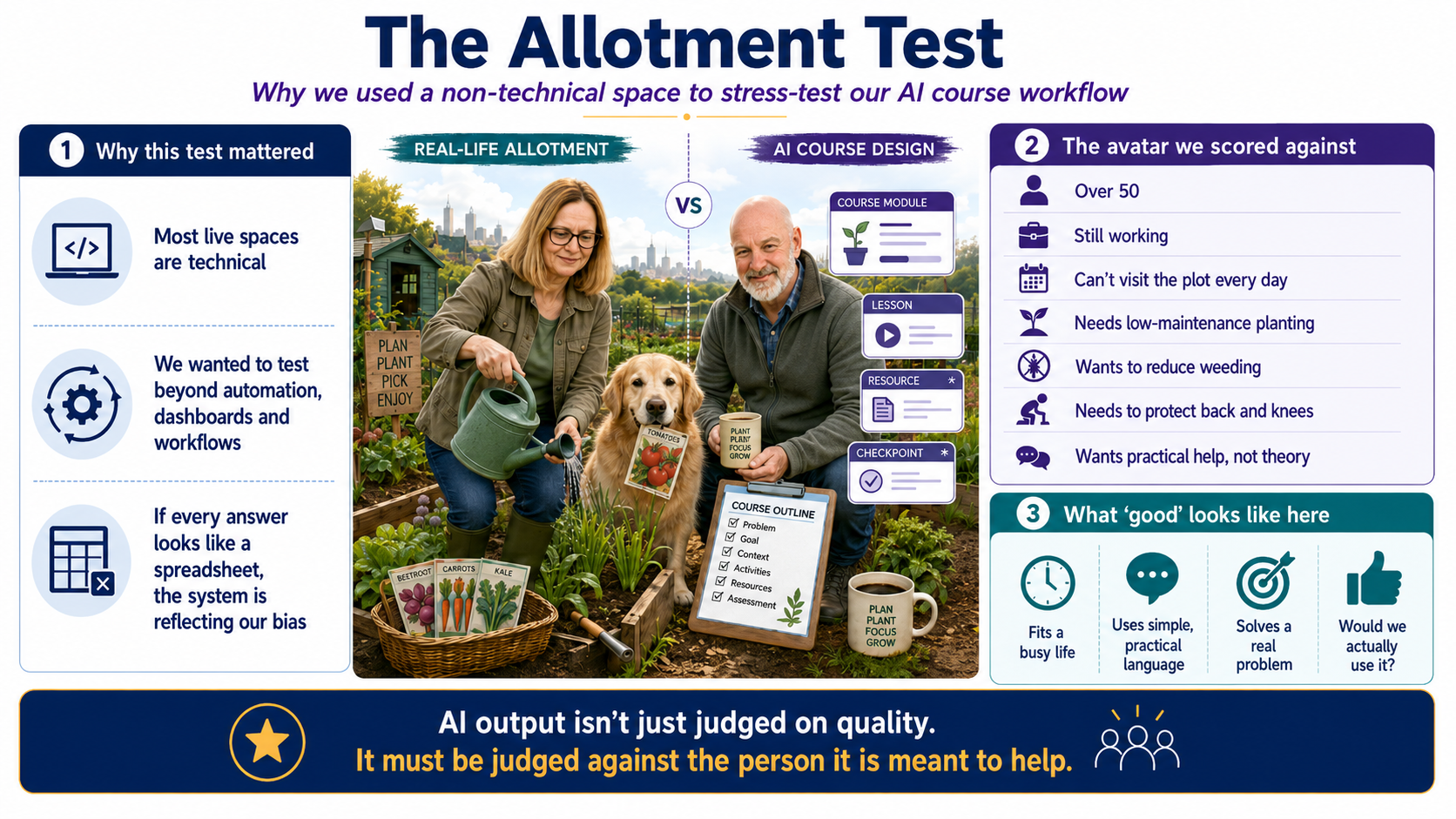
The allotment test was useful for another reason too.
Helen and I genuinely need the help.
- We’re two years into having an allotment.
- We’re not retired.
- We can’t pop down every day and spend hours tending the plot.
- We’re working around the clock. Building Collab365 Spaces. Supporting customers. Taking calls. Dealing with normal small business chaos.
So our real problem isn’t:
"How do you grow vegetables?"
It’s:
"How do we plan and manage an allotment around a busy working life when we can’t be there every day?"
That’s a very different question.
And it changes what "good" looks like.
A generic course might teach planting, watering, weeding and crop rotation.
All useful.
But for us, a good course has to understand things like:
- we might only get there a few times a week
- we need low-maintenance planting choices
- we need ways to reduce weeding
- we need watering ideas that survive real life
- we need to protect our backs and knees (me back is hurting from last weeks effort 😭)
- we do not want the allotment to become another full-time job
That became the real test.
Not:
"Does this look like a course?"
But:
"Would we actually use this?"
That’s a much higher bar.
And it exposed something important.
AI can create something that scores well in general…
…and still fail the person it was meant to help.
That’s why the scoring gates matter.
And it’s also why the avatar matters just as much as the content.
It’s not enough for AI to produce something relevant, accurate and clear.
It has to be relevant, accurate and clear for that specific person.
We’ve also learned that all of this needs boundaries.
Because AI quality control can get expensive fast.
If you let every lesson go through endless scoring and rewriting loops, you’ll burn a fortune.(have you seen the price of Opus 4.7?)
So we’re careful.
Cheaper models do simpler jobs. Stronger models do harder judgement calls. We limit the improvement loops. Then humans review the final result.
That last part still matters.
The prompt creates the work.
The scoring gates decide whether it deserves to survive.
And I think this lesson goes way beyond courses.
If AI writes a customer email, don’t just ask:
"Is this well written?"
Ask:
"Is it right for this customer?"
If AI writes an internal process, don’t just ask:
"Is this clear?"
Ask:
"Could the actual person doing the work follow this on a busy Tuesday?"
If AI writes a proposal, don’t just ask:
"Does this sound professional?"
Ask:
"Does it speak to the buyer’s real pressure?"
That’s the shift.
AI has made it much easier to create more.
More emails. More documents. More courses. More reports. More posts. More specs.
But more isn’t the win.
Better is the win.
And better only means something when you define who it’s for.
So if you’re using AI in your business, the three questions I’d ask are:
- Who is this for?
- What does good look like for them?
- What gates should this pass before we trust it?
Because AI can make work look finished.
But finished is not the same as useful.
And "good" doesn’t mean much until you know who it’s good for.